---
title: Case law
description: Information on case law on vLex
---
[Skip to content](https://knowledge.vlex.com/en/document-types/vlex-case-law#main-content)
English
Show submenu for translations

Open main navigation
Close main navigation
- English
Show submenu for translations
- [Contact us](https://knowledge.vlex.com/en/support-1/contact-us)
[Contact us](https://knowledge.vlex.com/en/support-1/contact-us?hsLang=en)
How can we help you?
- There are no suggestions because the search field is empty.
1. [Help Center](https://knowledge.vlex.com/en?hsLang=en)
2. [Document Types](https://knowledge.vlex.com/en/document-types?hsLang=en)
3. [Case Law](https://knowledge.vlex.com/en/document-types?hsLang=en#case-law)
# Case law
## vLex has the largest global collections of case law available anywhere online.
You can search for case law in a variety of ways on vLex. One option is to enter your search terms into the simple search bar and use the [**Case law filter**](https://knowledge.vlex.com/en/getting-started/search-results/filter-results?hsLang=en) to focus your results on that type of content **.** Alternatively, you could start from [**Browse**](https://knowledge.vlex.com/en/getting-started/quick-start-guide/use-browse?hsLang=en) and filter by Case law, or use the **Content** option on the [**Advanced search**](https://knowledge.vlex.com/en/getting-started/quick-start-guide/advanced-search?hsLang=en) page.
To skip to the video, click [here](https://knowledge.vlex.com/en/document-types/vlex-case-law#vid).
#### Case law searching from Browse
From **Browse** , click **Case law** *.* You can then select whether to filter cases **By category** , **By court** or **By report** (where available). At this stage, you can filter your search further, or you can choose to ***View all*** .
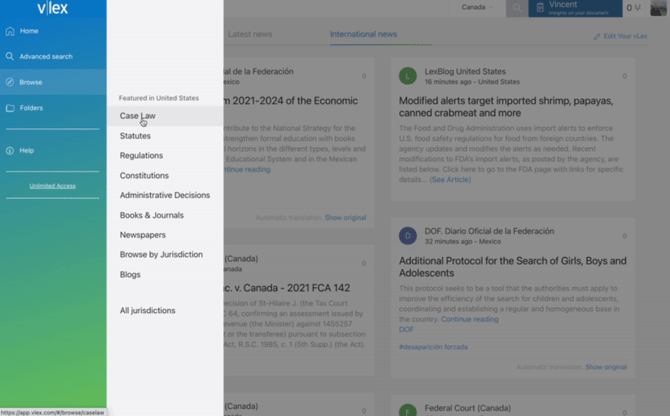
Filters in **Browse** vary depending on your jurisdiction *.*
#### **Case law searching from Advanced search**
From **Advanced search,** select **Case law** as your content type, then conduct your search normally.
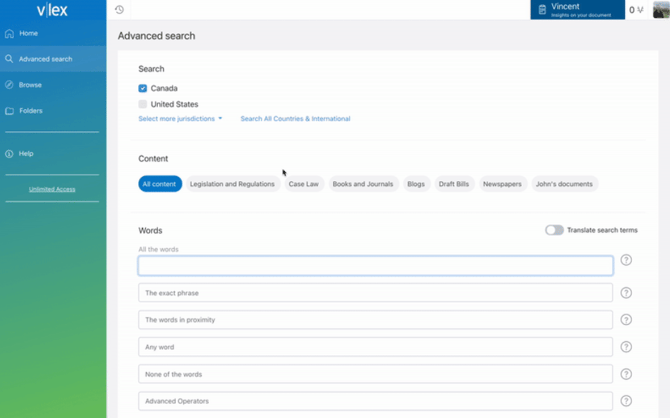
When you select **Case law** , content-specific filters will replace the general filters below.
#### Filters for case law
When you are searching for case law, you can filter your results by:
- **Citation** : if you know the citation of your case, you can enter it to quickly find what you are looking for. vLex recognises parallel citations for cases that have been reported in multiple collections.
- **Court** : select **Court** to open [a pop-up menu](https://knowledge.vlex.com/en/getting-started/search-results/filter-results?hsLang=en) . This will allow you to choose which court(s) you want to search across. Use the + sign to add a court from the left column, and the – sign on the right column to remove it.
- **Case date:** search by the date of the judgment. This field has three options:
- **Since** : only see cases published after a certain date.
- **Range of dates** : enter two dates and get results from within that range.
- **Exactly on** : select a specific date for cases heard on that day only.
- **Case name:** enter any words that you would expect to see in the title of a case, for instance, a party name or business. You can use [Boolean operators](https://knowledge.vlex.com/en/getting-started/quick-start-guide/boolean-operators-1?hsLang=en) in this field too. For example, you can use quotation marks around your search term to get an exact name match in your results.
- **Judge:** search for cases heard by a particular judge.
- **Category** : search for cases on a particular area of law. Once you have typed three letters, vLex will start offering suggestions for categories that match your search.
- **Report series:** click **Report series** to display the law reports vLex provides for your jurisdiction. You can only select one at a time, but you can add as many as you like to filter your results.
- **Cited authorities:** you can select **Cited authorities** to filter cases based on the documents it cites. Start typing and a list of suggestions will appear.
- **vLex Document ID:** this is a number you can use to share documents with other users. You can get this number from the share menu.
#### Tabs in case law
**Judgment**
Under the **Judgment** tab, you will be able to read the unreported version of a case. You can use the [notes and highlights](https://support.vlex.com/features/document-management/notes-and-highlights) feature to add comments and highlight important sections of the text.
At the top of the **Judgment** tab, you will see our [document analysis tools](https://knowledge.vlex.com/en/getting-started/documents?hsLang=en) that will give you a broader context of the case without the need to read the whole text.
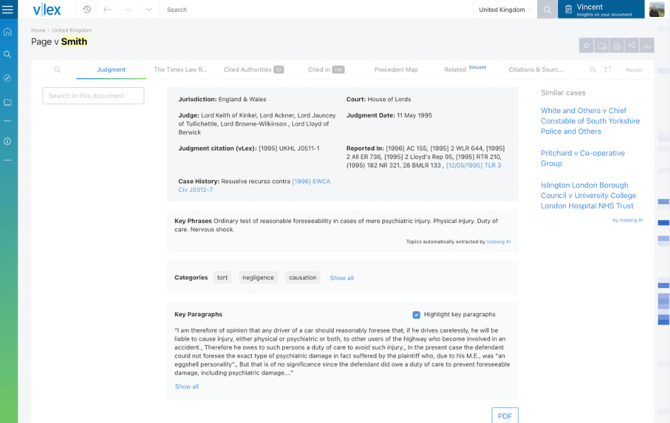
**Case history:** this section displays the jurisdiction, judge, judgment date, and parallel citations of a case.
**Key phrases:** short sentences to give you a small insight into the case.
**Categories:** common themes found in the case. You can expand this card by clicking **Show all.** Selecting any category will open a new page with other documents that share the same tag.
**Key paragraphs:** the sections of the text that have been most relied upon by other cases. You can expand these by clicking **Show all** .
**Judgments and reported cases**
When you are viewing a case, the original judgment will be under the **Judgment** tab, and any reported versions of the case will be under separate tabs. The following case has been reported in both the Session Cases and Scots Law Times.
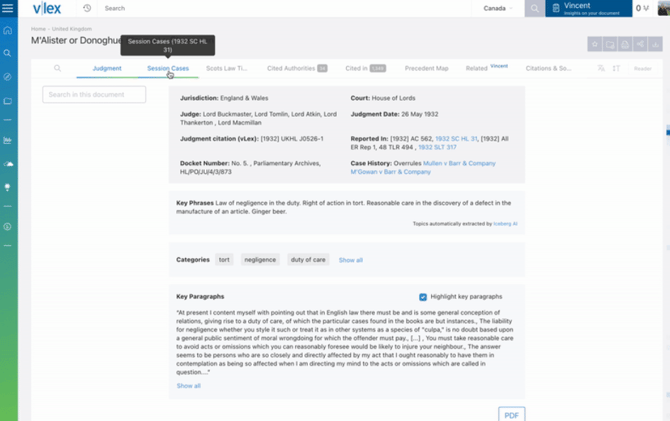
**Case relationships**
When you conduct legal research, it is vital to know how cases have been subsequently treated, before you rely on them as an accurate statement of the law. When looking at case law, [**Cited authorities**](https://knowledge.vlex.com/en/document-types/case-law/cited-authorities?hsLang=en) , [**Cited in**](https://knowledge.vlex.com/en/document-types/case-law/cited-in?hsLang=en) and the [**Precedent Map**](https://knowledge.vlex.com/en/document-types/case-law/precedent-map?hsLang=en) will allow you to see case relationships.
In these three tabs, the [treatment types](https://knowledge.vlex.com/en/document-types/case-law/treatment-types?hsLang=en) are colour-coded; green for a positive treatment, red for negative, and grey for neutral or unclassified treatments. Unclassified means they have not been assigned a treatment type by vLex.
**Citations in context**
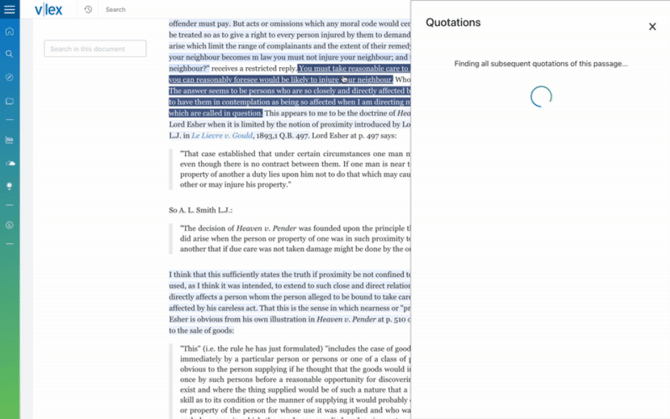
At the top of each case, you will see **Key paragraphs** . These are the most frequently cited passages of a judgment, and can give you a quick but strong indication as to why this is an important case. Any passages of the case that have been cited elsewhere are also highlighted throughout the text. At a quick glance, you can focus your attention on the highlighted passages as these are arguably the most important parts of the judgment.
Key paragraphs are highlighted in blue; the darker the colour, the more heavily cited the passage. When you click on a highlighted section of text, a side panel will open with these quotations in context.
**Related (Vincent)**
Under this tab, you will see an array of highly related material, curated by vLex's artificial intelligence tool, [Vincent](https://knowledge.vlex.com/en/features/vincent?hsLang=en) . Based on the documents and topics that Vincent finds, it will recognise similar documents and suggest relevant further reading to you.
#### Video walkthrough
- [Getting Started](https://knowledge.vlex.com/en/getting-started?hsLang=en#main-content)
- [Sign In](https://knowledge.vlex.com/en/getting-started?hsLang=en#sign-in)
- [Set Up](https://knowledge.vlex.com/en/getting-started?hsLang=en#set-up)
- [Home Page](https://knowledge.vlex.com/en/getting-started?hsLang=en#home-page)
- [Searching](https://knowledge.vlex.com/en/getting-started?hsLang=en#searching)
- [Results Page](https://knowledge.vlex.com/en/getting-started?hsLang=en#results-page)
- [Document Viewer](https://knowledge.vlex.com/en/getting-started?hsLang=en#document-viewer)
- [Document Types](https://knowledge.vlex.com/en/document-types?hsLang=en#main-content)
- [Case Law](https://knowledge.vlex.com/en/document-types?hsLang=en#case-law)
- [Legislation](https://knowledge.vlex.com/en/document-types?hsLang=en#legislation)
- [Features](https://knowledge.vlex.com/en/features?hsLang=en#main-content)
- [Document Management](https://knowledge.vlex.com/en/features?hsLang=en#document-management)
- [Stay Updated](https://knowledge.vlex.com/en/features?hsLang=en#stay-updated)
- [Vincent AI](https://knowledge.vlex.com/en/vincent-ai?hsLang=en#main-content)
- [Research Workflows](https://knowledge.vlex.com/en/vincent-ai?hsLang=en#research-workflows)
- [Document Workflows](https://knowledge.vlex.com/en/vincent-ai?hsLang=en#document-workflows)
- [Collections](https://knowledge.vlex.com/en/vincent-ai?hsLang=en#collections)
- [Vincent AI Features](https://knowledge.vlex.com/en/vincent-ai?hsLang=en#vincent-ai-features)
- [Support](https://knowledge.vlex.com/en/support?hsLang=en#main-content)
- [Account Management](https://knowledge.vlex.com/en/support?hsLang=en#account-management)
- [Frequently Asked Questions](https://knowledge.vlex.com/en/support?hsLang=en#frequently-asked-questions)
- [Admin Users](https://knowledge.vlex.com/en/admin-users?hsLang=en)
- [Spain](https://knowledge.vlex.com/en/spain?hsLang=en)
- [Affiliated Solutions](https://knowledge.vlex.com/en/affiliated-solutions?hsLang=en)
[%20Logo%20Blue.png?width=479&height=297&name=Logo_vLex%20(part%20of%20Clio)%20Logo%20Blue.png)](http://vlex.com?hsLang=en)
123 Waverly Pl., Boston, MA 02135
Copyright © 2025, vLex